


The SBI Clerk Hand Written Declaration 2026 is a compulsory document that candidates must upload while submitting the SBI Clerk online application form. The declaration must be written by the candidate in their own handwriting, scanned clearly, and uploaded in the format and file size prescribed by the State Bank of India.
Candidates should ensure that the SBI Clerk handwritten declaration is not typed, written in capital letters, or uploaded in an incorrect format, as this may lead to issues during the application process. Before submitting the form, check the official declaration text, image dimensions, file size, format, and other upload specifications carefully.

SBI Clerk Handwritten Declaration 2026
The SBI Clerk handwritten declaration must be written by the candidate in English using black ink on plain white paper. It should be saved as a JPG/JPEG image, with a preferred size of 800 × 400 pixels at 200 DPI and a file size of 50 KB to 100 KB. The declaration must be written in normal handwriting and must not be in CAPITAL LETTERS.

SBI Clerk Handwritten Declaration 2026 Format
Candidates must write the SBI Clerk handwritten declaration 2026 exactly in the prescribed format. The declaration should be written clearly by the candidate in English on plain white paper using black ink.
SBI Clerk Handwritten Declaration Text
“I, ______(Name of the candidate), Date of Birth ______ hereby declare that all the information submitted by me in the application form is correct, true and valid. I will present the supporting documents as and when required. The signature, photograph and left thumb impression is of mine.”
The candidate should replace the blank spaces with their actual name and date of birth. The complete declaration must be handwritten by the applicant.
Important Point
Do not change the wording unnecessarily. Write the declaration clearly and completely, and make sure that no part of the text is cut off when the document is scanned.
SBI Clerk Handwritten Declaration Size and Dimensions
The SBI Clerk handwritten declaration image must follow the prescribed technical specifications.
| Specification | Requirement |
| File Type | JPG / JPEG |
| File Size | 50 KB – 100 KB |
| Dimensions | 800 × 400 Pixels |
| Resolution | 200 DPI Preferred |
| Physical Size | Approximately 10 cm × 5 cm |
| Language | English |
| Ink | Black |
| Background | Plain White Paper |
The image should be clear enough for every word to remain readable after uploading.
How to Write SBI Clerk Handwritten Declaration 2026?
Candidates can prepare the SBI Clerk handwritten declaration correctly by following these steps:
Step 1: Take a Plain White Sheet
Use a clean, blank white sheet of paper. Avoid using ruled paper, coloured paper, printed sheets, or paper containing unnecessary marks.
Step 2: Use a Black Ink Pen
Write the declaration using a black ink pen. The writing should be dark, clear and easy to read.
Step 3: Write the Declaration in English
The declaration must be written in English. Do not translate the text into Hindi or another language.
Step 4: Write It in Your Own Handwriting
The declaration must be written by you personally. Do not type and print it, and do not ask another person to write it on your behalf.
Step 5: Avoid CAPITAL LETTERS
Write the declaration in normal handwriting. A handwritten declaration written entirely in CAPITAL LETTERS is not accepted.
Step 6: Scan the Declaration Clearly
Scan the completed declaration at the required quality and ensure that the entire text is visible.
Step 7: Check the File Size and Dimensions
Before uploading, confirm that the image is in JPG/JPEG format, has the required 800 × 400 pixel dimensions, and falls within the 50 KB to 100 KB file-size limit.
SBI Clerk Handwritten Declaration Upload Process
After preparing and scanning the SBI Clerk handwritten declaration, candidates can upload it during the SBI Clerk online application process.
Step 1: Open the SBI Clerk Application Form
Log in to your SBI Clerk application form using your registration credentials.
Step 2: Go to the Document Upload Section
Open the section where the application asks you to upload the photograph, signature, left thumb impression and handwritten declaration.
Step 3: Select the Handwritten Declaration Option
Choose the upload option specifically provided for the handwritten declaration.
Step 4: Select the Scanned Image
Browse your device and select the correctly prepared JPG/JPEG file.
Step 5: Upload the Declaration
Upload the image and wait for the system to process it.
Step 6: Preview the Uploaded Image
Check the preview carefully. Make sure the complete declaration is visible and readable, with no missing words, excessive cropping or blur.
Step 7: Correct Any Problem Before Final Submission
If the uploaded image is unclear or incorrect, replace it before submitting the final application. Candidates are responsible for ensuring that all required documents are uploaded correctly.
SBI Clerk Handwritten Declaration: Important Points to Remember
Candidates should check the following before uploading the declaration:
- Write the SBI Clerk handwritten declaration in your own handwriting.
- Use black ink.
- Use plain white paper.
- Write the declaration in English only.
- Do not write the declaration in CAPITAL LETTERS.
- Do not type or print the declaration.
- Do not ask another person to write it.
- Use JPG/JPEG format.
- Keep the file size between 50 KB and 100 KB.
- Use 800 × 400 pixels dimensions.
- Use 200 DPI for the preferred scanning quality.
- Make sure every word is clearly visible.
- Do not upload the declaration in the wrong document field.
- Check the uploaded image before submitting the application.
Why Is the SBI Clerk Handwritten Declaration Required?
The SBI Clerk handwritten declaration is used as a candidate-authenticated statement associated with the information submitted in the application. It confirms that the information provided by the candidate is correct, true and valid and that the supporting documents will be produced when required.
Because the declaration is meant to be submitted personally by the applicant, the instructions require it to be written in the candidate’s own handwriting.
Common Mistakes in SBI Clerk Handwritten Declaration
Small mistakes in the SBI Clerk handwritten declaration can create unnecessary problems during the application process. Avoid these common errors.
Writing the Declaration in CAPITAL LETTERS
Do not write the complete declaration in capital letters. The prescribed instructions specifically state that handwritten declarations in CAPITAL LETTERS are not accepted.
Using a Blue Pen
Use a black ink pen for writing the declaration. Avoid preparing the document with a blue or other coloured pen.
Writing It on Ruled or Coloured Paper
Use plain white paper so that the scanned image is clean and easy to read.
Typing and Printing the Declaration
A typed declaration is not a substitute for the required handwritten declaration. The declaration must be written by the candidate in their own handwriting.
Asking Someone Else to Write It
The declaration must be in the applicant’s own handwriting. Writing it through another person can result in the application being treated as invalid.
Writing the Declaration in Hindi
The declaration must be written in English. Do not translate the prescribed text into Hindi or another language.
Uploading an Unclear Image
A blurred, cropped, too-dark or poorly scanned declaration may make the text difficult to read. Always preview the uploaded image before final submission.
Uploading the Declaration in the Wrong Field
Make sure the declaration is uploaded in the specific handwritten declaration field. Do not accidentally upload your photograph, signature or another document in its place.
SBI Clerk Handwritten Declaration Checklist
Before submitting the application, use this checklist:
| Check | Status |
| Written in own handwriting | ☐ |
| Written in English | ☐ |
| Written with black ink | ☐ |
| Plain white paper used | ☐ |
| Declaration not written in CAPITAL LETTERS | ☐ |
| Correct declaration text used | ☐ |
| JPG/JPEG format | ☐ |
| File size 50–100 KB | ☐ |
| Dimensions 800 × 400 pixels | ☐ |
| Image is clear and readable | ☐ |
| Complete declaration visible | ☐ |
| Uploaded in the correct field | ☐ |
| Upload preview checked | ☐ |
SBI Clerk Handwritten Declaration Sample
A correctly prepared SBI Clerk Handwritten Declaration should contain the prescribed text written completely by the candidate.
Example format:
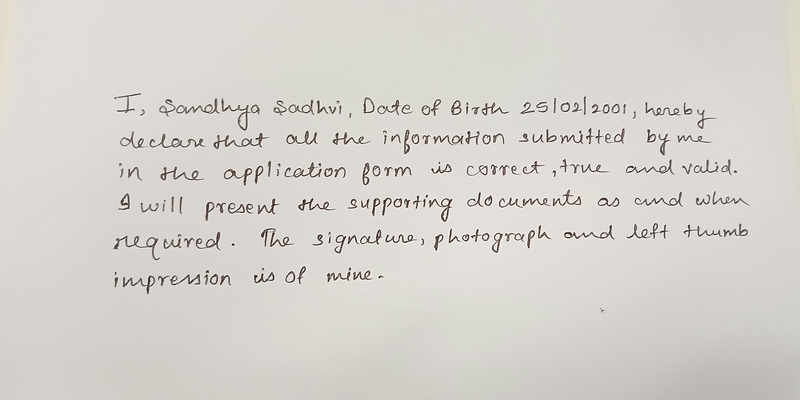
Note: Write your name and date of birth in the place of the name and date of birth written in the sample image above.
Conclusion
The SBI Clerk Handwritten Declaration 2026 is an important part of the online application process and must be prepared exactly according to the prescribed requirements. Candidates should write the declaration themselves in English, using black ink on plain white paper, and upload a clear JPG/JPEG image within the required 50 KB–100 KB file-size range and 800 × 400 pixel dimensions.
The most important thing is to avoid shortcuts: do not type the declaration, do not use another person’s handwriting, do not write it in capital letters, and do not upload an unclear image. Check the declaration carefully before submitting the SBI Clerk application form.
| Also Read | |
| SBI Clerk Previous Year Question Paper | SBI Clerk Exam Pattern |
| SBI Clerk Syllabus | SBI Clerk Salary |
| SBI Clerk Cut Off | SBI Clerk Vacancy |
FAQs on SBI Clerk Handwritten Declaration 2026
What is the SBI Clerk Handwritten Declaration?
The SBI Clerk Handwritten Declaration is a statement that candidates must write in their own handwriting and upload with the application form. It confirms that the information submitted in the application is correct, true and valid and that the candidate will provide supporting documents when required.
What should I write in the SBI Clerk handwritten declaration?
Candidates should write the prescribed declaration text exactly as required, including their name and date of birth in the designated blanks. It must be written completely in the candidate’s own handwriting using black ink on plain white paper.
Can I write the SBI Clerk handwritten declaration with a blue pen?
No. The prescribed instructions require the declaration to be written clearly on white paper using black ink. Candidates should follow the specified ink requirement while preparing the declaration.
Can I type the SBI Clerk handwritten declaration?
No. The declaration is required to be in the candidate’s own handwriting. A typed or printed declaration should not be used as a replacement for the required handwritten document.
Can I write the SBI Clerk handwritten declaration in Hindi?
No. The declaration has to be written in English. Writing and uploading it in another language can make the application invalid.
Can I write the SBI Clerk handwritten declaration in CAPITAL LETTERS?
No. The declaration should not be written in CAPITAL LETTERS. The prescribed instructions specifically state that signatures and handwritten declarations in CAPITAL LETTERS are not accepted.
What is the SBI Clerk handwritten declaration file size?
The handwritten declaration image should be between 50 KB and 100 KB. The preferred dimensions are 800 × 400 pixels, with 200 DPI recommended for the required image quality.
Who should write the SBI Clerk handwritten declaration?
The declaration must be written by the candidate themselves. It should not be written by another person. The declaration, signature and left thumb impression must belong to the applicant.
- Sign Up on Practicemock for Updated Current Affairs, Topic Tests and Mini Mocks
- Sign Up Here to Download Free Study Material
Free Mock Tests for the Upcoming Exams
- IBPS PO Free Mock Test
- RBI Grade B Free Mock Test
- IBPS SO Free Mock Test
- NABARD Grade A Free Mock Test
- SSC CGL Free Mock Test
- IBPS Clerk Free Mock Test
- IBPS RRB PO Free Mock Test
- IBPS RRB Clerk Free Mock Test
- RRB NTPC Free Mock Test
- SSC MTS Free Mock Test
- SSC Stenographer Free Mock Test
- GATE Mechanical Free Mock Test
- GATE Civil Free Mock Test
- RRB ALP Free Mock Test
- SSC CPO Free Mock Test
- AFCAT Free Mock Test
- SEBI Grade A Free Mock Test
- IFSCA Grade A Free Mock Test
- RRB JE Free Mock Test
- Free Banking Live Test
- Free SSC Live Test